Empuan
Setting Up Fake Call Contacts
Add trusted contacts to your Fake Call feature. This tool helps you simulate incoming calls for emergency situations.
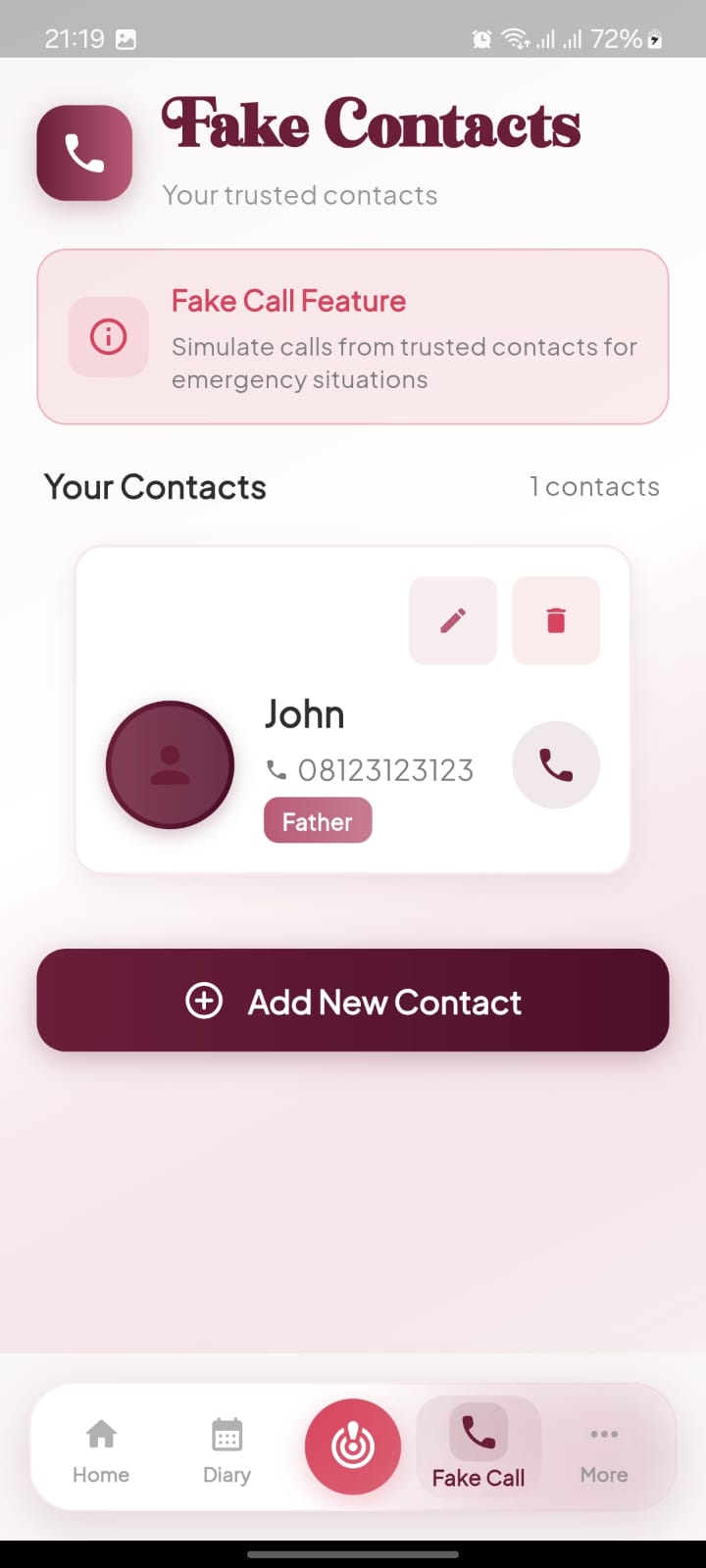
Open the Fake Call Menu
Tap the Fake Call icon located on the bottom navigation bar.
- check_circle The icon is shaped like a phone receiver.
Create a New Entry
Select the Add New Contact button to begin entering contact details.
- check_circle This button is the large purple bar at the bottom of your screen.
Input Name
Type the name of the person you want to appear on the call screen in the Name field.
- check_circle Choose a name that provides a sense of safety during an emergency.
Input Phone Number
Fill in the Phone Number associated with your fake contact.
- check_circle You can enter a real or placeholder number for the display.
Set Relation
Enter the relationship in the Relation field to categorize the contact.
- check_circle Common examples include Father, Mother, or Brother.
Finalize Entry
Tap the Save Contact button to add the person to your trusted list.
- check_circle A checkmark icon is visible on this button.
Verify the Contact List
View your new entry under the Your Contacts section.
- check_circle Use the phone icon next to the name to trigger the fake call immediately.