female
Empuan
login
Getting Started: Login
Learn how to access your account and navigate the core features of your holistic health companion.
01
1
Open the App
Launch the Empuan app and tap on the Login button on the welcome screen to proceed.
- check_circle Make sure you have a stable internet connection.
- check_circle If you don't have an account yet, tap <span class="text-white font-medium">Sign Up</span> instead.
02
2
Login to Your Account
Enter your registered Email and Password. Once filled, tap the Log In button.
- check_circle You can tap the eye icon in the password field to toggle visibility.
- check_circle Double-check for typos in your email address.
03
3
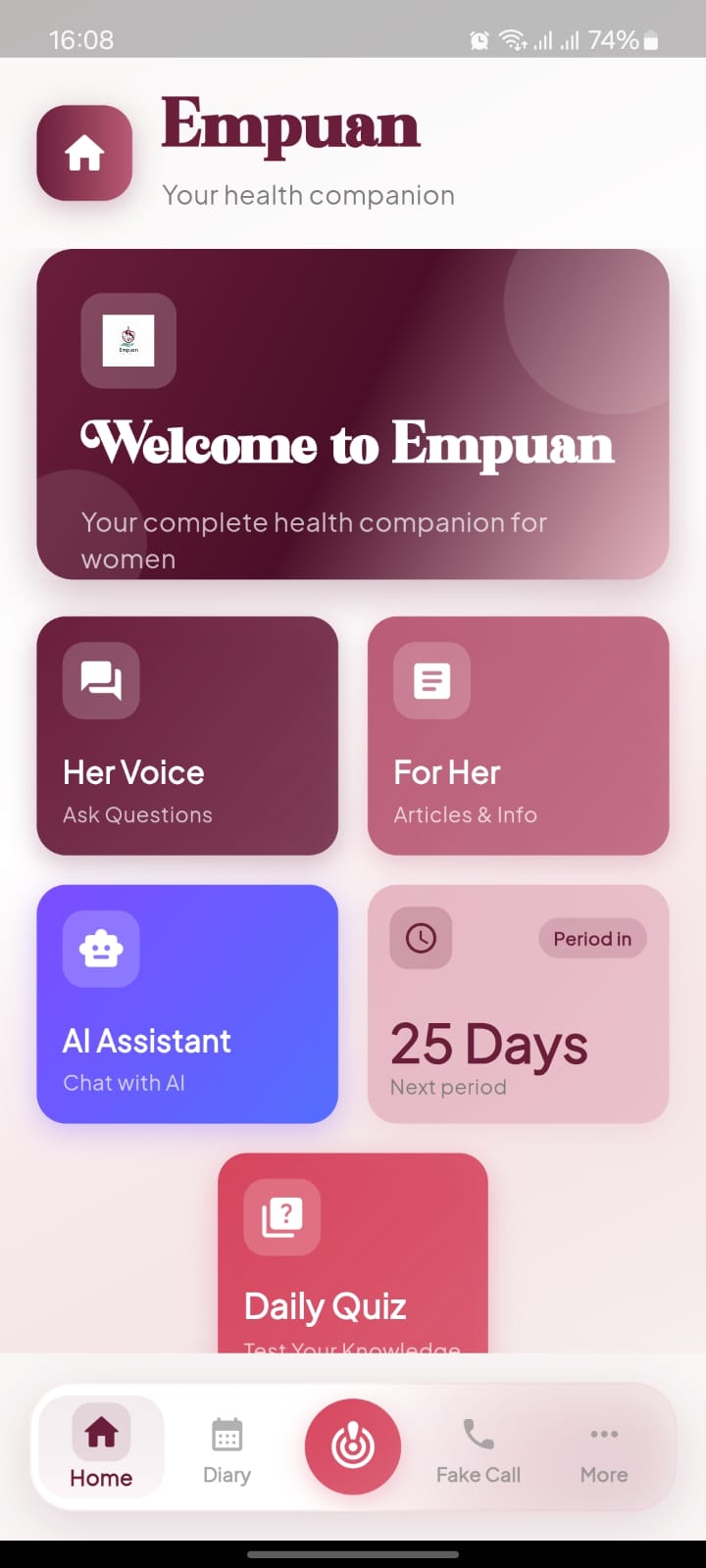
Explore Your Health Companion
You will see your personalized dashboard after logging in. This area features Her Voice, For Her, and the AI Assistant. You can also track your cycle in the Next Period section.
- check_circle Access your Diary or the Fake Call safety feature using the bottom navigation bar.
- check_circle Use the Daily Quiz to test your health knowledge.